
By the time someone calls me, it's usually already happened. Onboarding ran on manual tickets for months. An audit surfaced accounts that should have been closed a year ago. Or a terminated employee still had active access to production systems.
Same pattern, different organization. No real JML process — not a broken one, just nothing defined. And the longer it runs that way, the harder and more expensive it is to clean up.
What Is Joiner Mover Leaver (JML)?
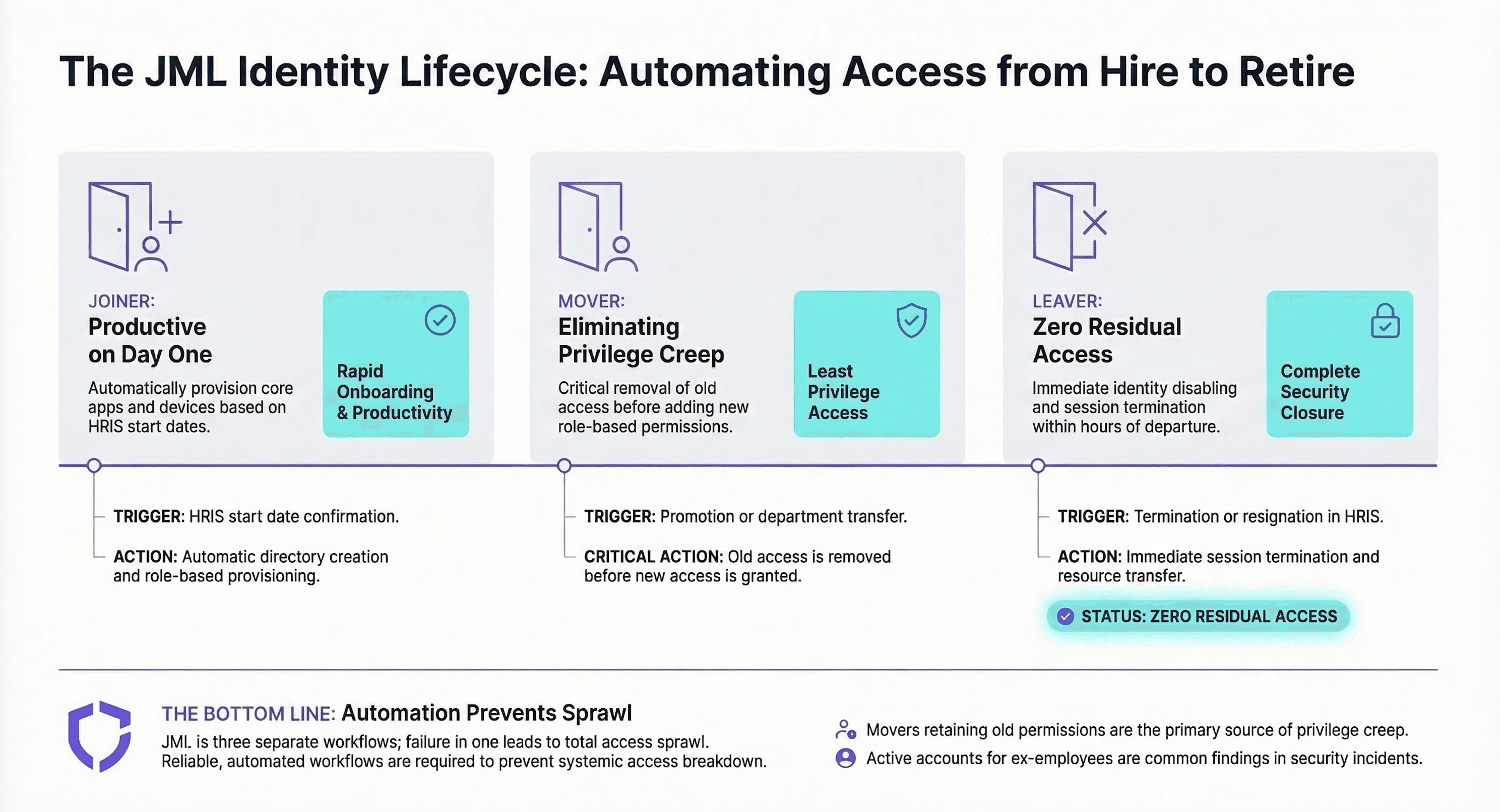
JML stands for Joiner, Mover, Leaver — the three lifecycle events that determine how a person's access should change over time.
Joiner: A new person joins the organization. They need an identity, baseline access, and the right tools ready on day one — not day three after IT finishes their ticket queue.
Mover: Someone changes roles, teams, or locations. Their access must reflect the new role — which means old access gets removed, not just new access added.
Leaver: Someone exits. Access must be revoked quickly, ownership transferred to the right people, and a clear audit trail must exist to prove it happened.
Simple concept. Difficult execution. In the organizations I work with, "access" is never one system — it's dozens. Email, chat, VPN, HR platforms, finance tools, code repos, ticketing systems, cloud consoles, and admin panels. Without a defined JML process, every lifecycle change becomes a one-off exception handled differently by whoever happens to be on call that day. And exceptions compound fast.
 Click to zoom
Why JML Matters
I hear JML sold as an efficiency play — fewer tickets, less manual work. That's true, but it undersells the real value by a lot. In my experience, a mature JML program addresses three outcomes every organization actually cares about — and the efficiency benefit is almost a side effect.
1. Security: Stop Privilege Creep Before It Starts
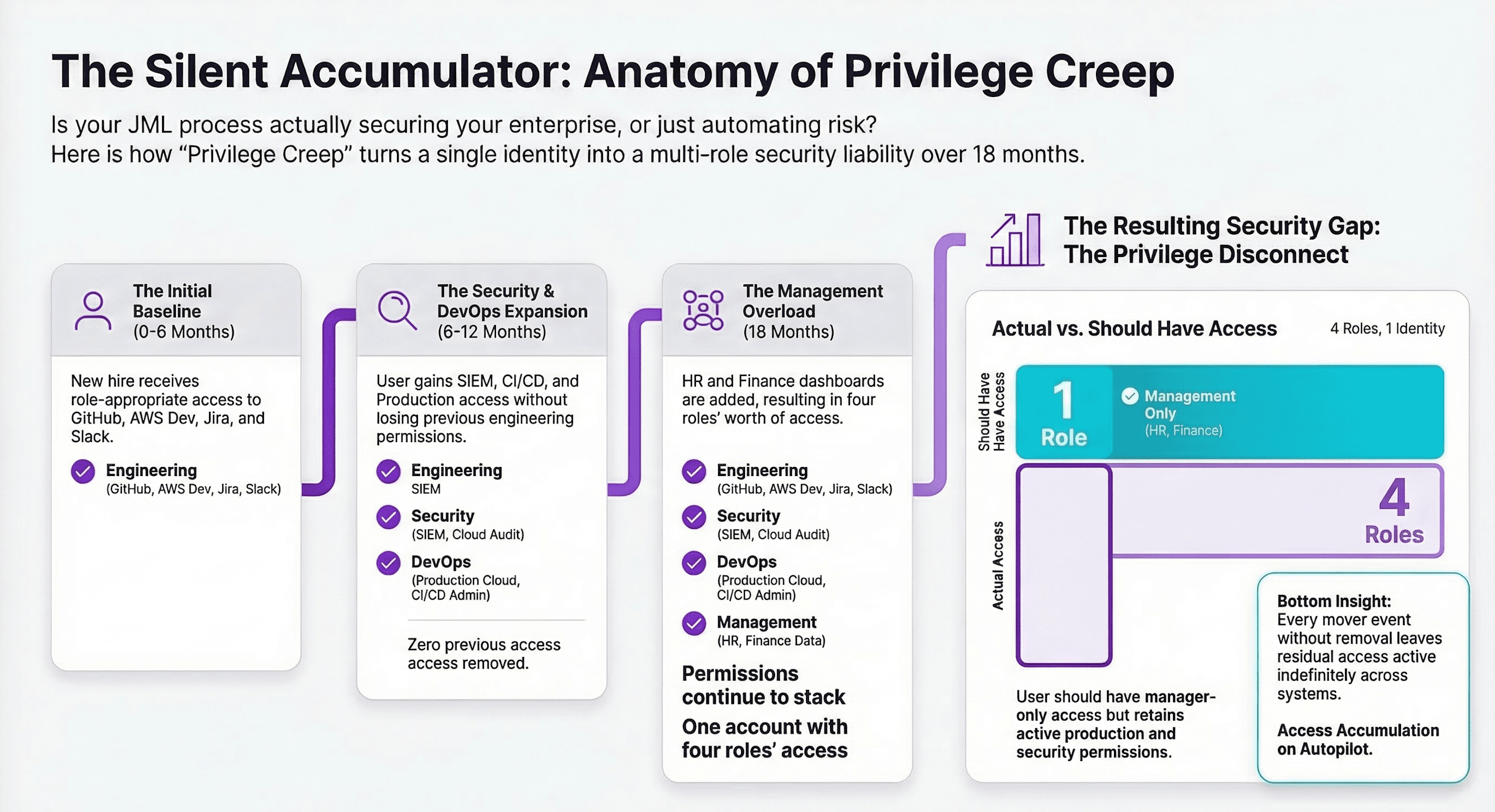
The biggest access risks I encounter aren't dramatic breaches. They're boring, predictable failures that nobody caught in time:
- An employee changed teams but kept their old system privileges.
- A contractor left and still had SaaS access six months later.
- A "temporary" admin account was never revoked.
- A shared mailbox remained unowned after the person who created it left.
None of these is surprising. That's the point. Mover events are where privilege creep originates. Leaver events are where orphaned access accumulates. Both are predictable — and predictable failures should be designed out, not managed around after the fact.
 Click to zoom
2. Compliance: Produce Evidence, Not Assurances
I've sat in a lot of audit prep sessions. The conversation always goes the same way when JML is weak — the team tries to reconstruct a story from scattered tickets and email threads instead of pointing to a system. Auditors don't care that you have an IAM tool. They care that you can demonstrate:
- Access is granted based on defined, consistent rules.
- Privileged access has proper oversight and approval.
- Access is removed on time when people leave or change roles.
- You can reconstruct who had access to what and when.
A working JML process produces evidence. Not "trust us." Verifiable, timestamped evidence.
3. User Experience: Day One Productivity
A well-designed Joiner flow means the user has baseline access on day one — not after a week of IT tickets. Provisioning is part of the employee experience, whether IT frames it that way or not.
JML Is a Cross-Functional Contract
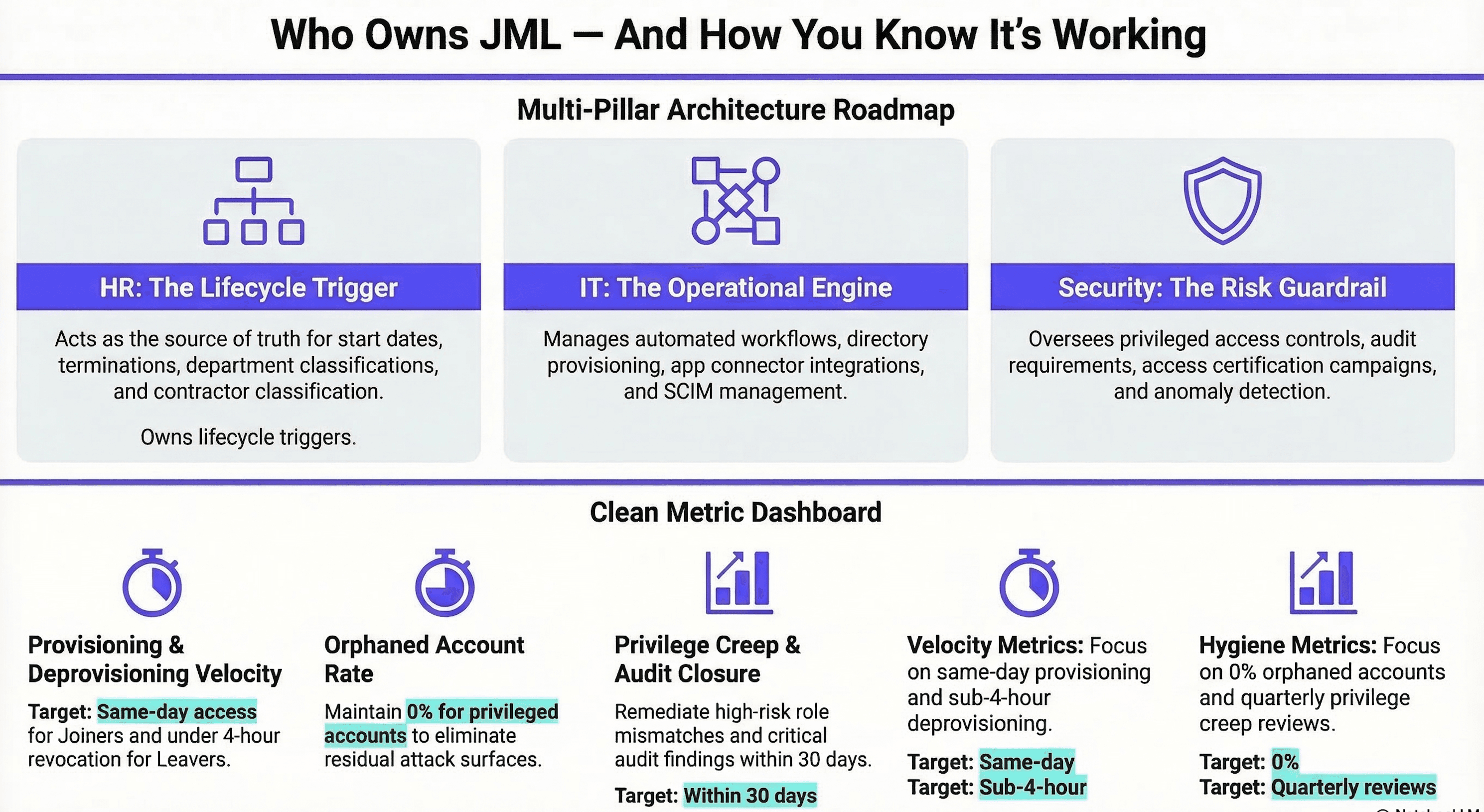
One of the most common things I see is IT trying to own JML entirely — and burning out on it because they can't get HR to send timely termination notices or get managers to respond to access review requests. JML fails when a single team tries to own it in isolation. Every time. The model that works distributes ownership clearly:
| Team | Owns |
|---|---|
| HR | Lifecycle events — start dates, terminations, role changes |
| IT | Systems, provisioning, and operational execution |
| Security | Risk posture, privileged access controls, and audit requirements |
If HR and IT aren't aligned, you get late or missing lifecycle events. If Security isn't at the table, you get fast access with no guardrails — the right model: shared ownership, automated execution.
What Minimum Viable JML Looks Like
When I help teams start from scratch, I don't push for a massive maturity program on day one. I push for a small set of decisions and guardrails that are actually maintainable. Here's what I consider a realistic starting point:
1. Decide Your Source of Truth
Pick one system that defines core identity attributes: employee vs. contractor, department, role, manager, location — usually your HRIS. In smaller organizations, it might be your directory. Either way — one system wins. I've seen teams split this across two systems, and it always creates reconciliation problems. No split sources, no "we also track that in a spreadsheet."
2. Build a Basic Role and Access Model
You don't need 200 roles. When I start a JML design, I push for five or six — Engineering, Sales, Finance, Operations, IT Admin — and map each to the groups and entitlements that role actually requires. The goal is to eliminate the "every user is a unique snowflake" model that makes JML impossible to automate consistently.
Part of that model is defining your identity types upfront. Not all identities are the same, and treating them as if they are is how things break down:
- Standard users — employees and contractors with regular application access.
- Service accounts — non-human identities used by applications, automation scripts, and integrations. These are often the most neglected. No one thinks about them until something breaks or an audit asks who owns them.
- Privileged users — admins, engineers, and anyone with elevated access to systems, infrastructure, or sensitive data.
Each type has different provisioning rules, different review cadences, and different offboarding requirements. Define them early, so your access model reflects reality, not assumptions.
Similarly, employee type matters. Employees and contractors have different lifecycle timelines, risk profiles, and legal obligations. A contractor onboarded through a staffing agency shouldn't be provisioned the same way as a full-time hire — and their leaver process needs to be tighter, not looser.
3. Automate Provisioning and Deprovisioning for Your Top Applications
Pick your top 5–10 applications. Automate account creation, group assignment, license assignment, and account disable on departure. Don't try to solve everything at once — start where the business feels the most pain and prove the model works there first.
Before you scale, make sure your processes account for how provisioning actually works across your app stack. SCIM (System for Cross-domain Identity Management) is the standard that makes automated provisioning reliable — confirming support and licensing for it early saves a lot of friction later.
4. Add Guardrails for Privileged Access
Not all access carries equal risk. For privileged roles: require explicit approval, enforce step-up authentication, define who can grant access, and log everything. Privileged access without oversight is how "temporary" becomes permanent.
Two mechanisms that strengthen this significantly: access request workflows — so privileged access is never self-served or granted informally — and access recertifications (certification campaigns), which periodically confirm that existing access is still needed and appropriate. Both create accountability and keep privileged access from quietly outliving its purpose.
5. Log and Review What Matters
You don't need to log everything. You do need to capture: who got access, what changed, when it changed, why it changed, and who approved it. Then schedule a periodic review of admin assignments, high-risk groups, and exceptions. Quarterly is a starting point — monthly is better.
If tickets are your de facto audit trail, that's workable — but only if fields are standardized, approvals happen inside the ticket, and there's one place to look when an auditor asks. Most aren't structured that way, and that's where reconstructed stories come from.
Common JML Failure Modes
These are the patterns I run into most often — and the ones that cause the most damage quietly.
"Everything is a ticket." Tickets work for exceptions. They fail as a primary workflow. If every access change requires a manual ticket, nothing is consistent or measurable — and nothing improves. I've seen IT teams spend a third of their week just processing access tickets that could have been automated.
"Mover events don't remove old access." This is the one I see most often — and the single biggest driver of privilege creep. A mover flow that only adds access is not a mover flow. It's access accumulation with extra steps.
"Leaver means disabling the directory account — and nothing else." I always check downstream apps when I join an engagement. It's almost never fully clean. Turning off the identity is step one, not the whole process. Ownership transfer for mailboxes, shared drives, and repos — plus deprovisioning across every connected app — all have to happen too.
"No one owns the entitlement model." If no one owns the groups and application entitlements, they become a junk drawer fast. I've seen groups with 300 members where nobody could explain why half of them were there. Assign explicit owners to critical groups and applications, or they will drift — guaranteed.
"Contractors are treated like employees." They shouldn't be — different lifecycle timeline, different risk profile, different legal obligations. Every organization I've worked in has had at least one contractor access incident that could have been prevented with a proper contractor offboarding process.
 Click to zoom
How to Measure Whether JML Is Working
When I present JML program health to leadership, I keep it to five metrics: time to provision, time to deprovision, orphaned account rate, privilege creep indicator, and audit finding closure time. These translate to executives, auditors, and the business alike. Tracking them consistently shifts the conversation from "we think it's working" to "here's exactly how it's working."
Key takeaways
- JML is phase zero, not phase three. Build the lifecycle before access sprawl makes it impossible to reverse-engineer.
- Mover events are the biggest source of privilege creep. Old access must be removed — additions alone aren't enough.
- Leaver means more than deactivating the directory account. Downstream deprovisioning and ownership transfer are required.
- Contractors and employees need separate processes. Different lifecycle, different risk profile, different controls.
- Tickets are not a JML process. Standardize the fields, enforce approvals inside the ticket, and log everything in one place.
- Measure what matters. Time to provision, time to deprovision, orphaned account rate, and privilege creep indicator are your starting four.
If you're running on Okta and want to see how governance tooling automates the lifecycle layer described here — access certifications, access requests, and workflow automation for JML edge cases — Okta Identity Governance: What It Does and How It Scales covers exactly that. And if you're designing or rebuilding the identity lifecycle architecture itself, our IAM Architecture & Governance Advisory is where we start those engagements.